Oneline Display Object Custom Left-Click Behavior
PowerWorld oneline diagram objects have default behavior of what to do when the object is left-clicked on in Run Mode.
Most oneline display objects do not respond to a left mouse button click while in Run Model. There are a small number of exceptions such as the following
-
Circuit Breaker Objects on onelines will change the status the device when left clicked on.
-
Generator, Load, and Shunt objects can optionally have a circuit breaker symbol added that when clicked on it will change the device status
-
Bus Fields which show either the Bus Name or Bus Number will respond by opening the Bus View when you click on those fields
-
Links to Onelines and Auxiliary Files provide a way to open another Oneline to a particular Saved View, open and AUX file, or run a script command
-
Document Links on Onelines provide a way to open a URL address or any kind of file associated with applications on your Windows system
-
Memo Text Background objects have special features for running script commands or load an AUX file which were added in added in December 16, 2024 patch of Version 23
There are some other custom-behavior which can be defined for some display objects
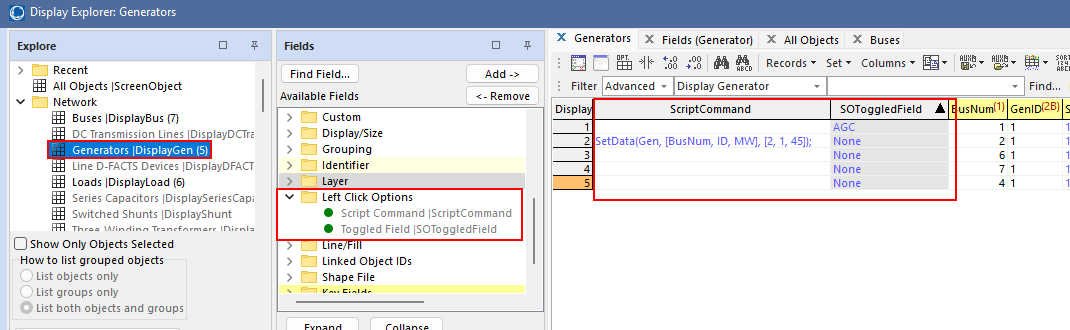
SOToggledField and ScriptCommand
You can customize the left-click behavior in very generic ways for most Display Objects. To do this you must edit special fields of the Display Object that are only available for editing via an AXD file or by accessing fields of the Display Objects using the Display Explorer. There are 2 special fields available under the folderLeft click Options called SOToggledField and ScriptCommand. These are shown in the image below. If the Display object is linked to an object (such as a generator display object in this example), then the SOToggledField is the variablename of a toggleable field for the object. When left-clicking on the display object in Run mode this field would then be toggled. Alternatively, you may specify the text of an Auxiliary file script command in the ScriptCommand field. When left clicking on the display object in Run Mode this script command would then be executed.