Object Groups
[ObjectGroups were added in Version 24]
ObjectGroups are groupings of objects which can be used for various reporting and filtering in Simulator.
-
ObjectGroups provide a mechanism to show summary information on groups of objects, such as generation MW or load MW summations.
-
An ObjectGroup can be used as a Device Filter on a table to show all the objects that are "contained" in the ObjectGroup (this works on any case information display, or in various Auxiliary File Script Commands. Also see the Auxiliary Format Description for a discussion of using Device Filters.
The best way to create and interact with ObjectGroups is to go to the Model Explorer choose Aggregations\Other Aggregations\Object Groups. This will open a dialog that looks as follows.
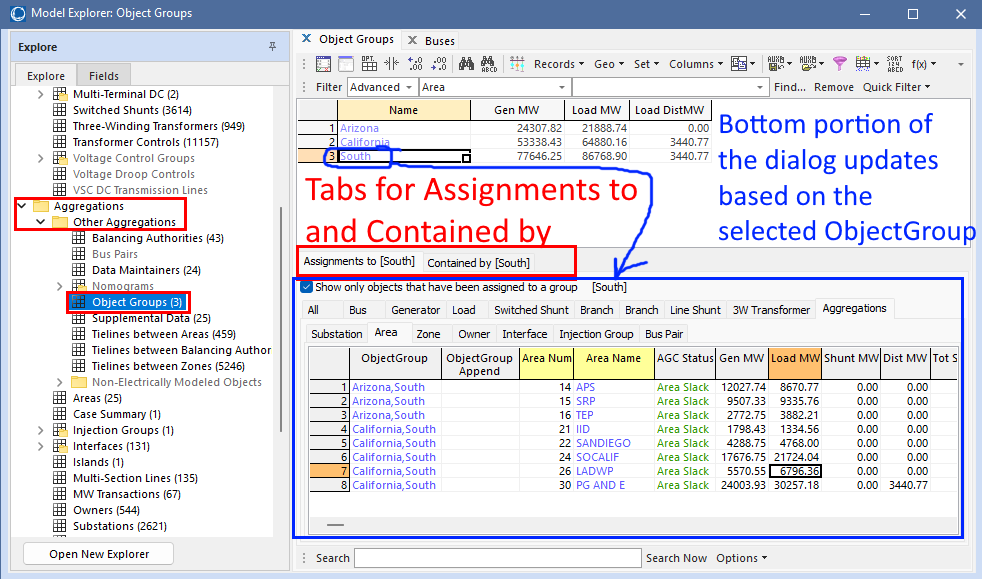
ObjectGroups listed by Name:
ObjectGroups are listed at the top by Name. The Name is the key field for an ObjectGroup. There are also various built-in summary fields available for the objects contained by the ObjectGroup which can be investigated by looking at Configuring the Case Information Displays. If you have additional summary fields you would like made available, please email support@powerworld.com to ask. In addition, you can create user-defined calculations across the contained objects by creating Calculated Fields definitions and using these as columns for an ObjectGroup.
When using ObjectGroups it is important to understand the difference between an object being assigned to a group and an object being contained by a group. There are tabs to show Assignments to and Contained by which are related to this.
Assignments to [South] - Assigning Object to an ObjectGroup
This tab has a large number of tabs for objects tabs that can be assigned to the ObjectGroup: Bus, Generator, Load, etc... and also a Aggregations tab under which more tabs are available for Substation, Area, Zone, etc... Each of these tabs will contain a case information display listing rows of that object type. When the checkbox Show only objects that have been assigned to a group is checked, then the case info displays are automatically filtered to only show those objects that have been assigned to the selected ObjectGroup (South in the example above). Objects that can be assigned to an ObjectGroup include Bus, Gen, Load, Shunt, LineShunt, Branch, 3WXformer, DCLine, Substation, Area, Zone, Owner, BalancingAuthority, Interface, BusPair, InjectionGroup, and some others. If you ever find an object type in PowerWorld that does not support assignment to an ObjectGroup and you would like to have that ability, please email support@powerworld.com.
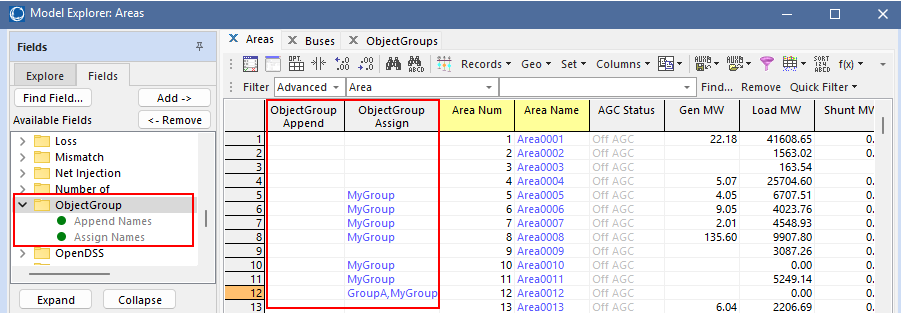
The first two columns will default to ObjectGroup and ObjectGroup Append. These are used to assign objects to ObjectGroups. These columns can be added to any case information display of an object type that can be assigned to an ObjectGroup, but they are only default columns on these tables.
|
ObjectGroup\Append Names This field always shows a blank, but when a string is entered into this field, then the object is added to the group with that name. If the group does not exist then a new group is created. You may also enter a comma-delimited list of Names to assign one object to multiple ObjectGroups ObjectGroup\Assign Names This field show a comma-delimited list of the names of all ObjectGroups to which an object has been assigned. Objects can belong to any number of groups. When editing this field it will change all ObjectGroups to which the object is assigned. If you want to add one object to one ObjectGroup it is easier to use the Append Names field. |
|
Contained by [South] - List of Objects Contained by an ObjectGroup
This tab has the same set of tabs as the Assignments To Tab, however instead it will show case information displays with a list of all objects that are contained by the selected ObjectGroup.
Objects that are not directly assigned to an ObjectGroup can still be contained by the ObjectGroup by inheriting containment from the underlying structure of the power system model. For example, consider an ObjectGroup named "MyGroup" with several Areas in the case assigned to "MyGroup". When this ObjectGroup is used as a Device Filter on a list of Areas, the list will only show those Areas that have been assigned to MyGroup. However, if the ObjectGroup is used as a Device Filter on a list of Generator objects, then the list will show any generator that is contained in one of the Areas in MyGroup. The concept of "assigned to" is restricted to exactly what the user defines, while the concept of "contained by" will inherit from the built-in object structure defined in the power system data structure. This is the same behavior used with Supplemental Data objects when they are configured to Inherit=YES. ObjectGroups are little simpler to use because you don't need to define the classification as you do with Supplemental Data objects, and also assigning an Object to an ObjectGroup that doesn't exist yet just automatically creates a new group. ObjectGroups behave the same way that as SupplementalClassification configured with Inherit=YES, Multiple = YES, and both Contain and Assign set to all power-system related model objects. See the Supplemental Data for more description of this.