 See Also
The Filtering Menu, contained on the Case Information Toolbar, gives access to several options regarding any Advanced Filters that can be applied to the active case information display. In addition it provides access to the Area/Zone/Owner Filters. The drop-down menu is shown in the following figure.
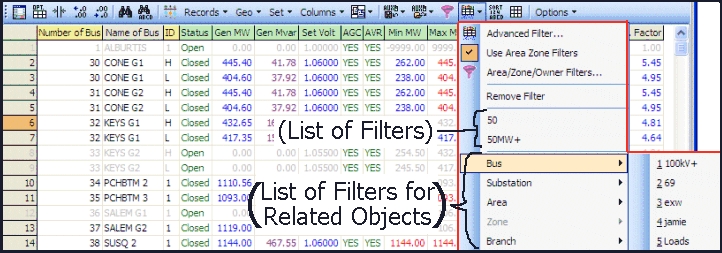
The top of the menu has four primary buttons that appear on all case information displays. These four are as follows
Allows the user to custom filter the information in the display based on desired criteria. See Advanced Filtering for more information.
Filters displayed records by selections made on the Area/Zone/Owner/DataMaintainer Filters display.
Area/Zone/Owner Filters
Opens the Area/Zone/Owner/DataMaintainer Filters display for setting the areas, zones or owners for which the filter should apply.
Remove Filter
Click this button to remove the Advanced Filter from the present case information display. This does not delete the Advanced Filter definition, but only removes the reference to it from the active case information display. The filter can easily to reapplied after removing it. If you would like to permanently delete an Advanced Filter see Advanced Filtering.
After the top section of the menu are two sections that may or may not be available for a particular case information display
(List of Filters)
This contains a list of advanced filters for the object type displayed in the active case information display. These filters would have already been created using either the Advanced Filtering dialog or by reading them from an Auxiliary File. In the example image above the "50" and "50MW+" entries represent filters that apply to a generator object. If there are more than 10 advanced filters for the present object type, then a submenu will be shown for the object type as well. Also if an advanced filter is presently applied to the case information display, then the active advanced filtered will be denoted with a check mark.
(List of Filters for Related Objects)
This contains a list of advanced filters whose object type is related to the type of record displayed in the active case information display. For example, the case information display shown in the figure above is showing generator records. Generator records allow you to filter the generator object using a Bus, Substation, Area, Zone, or Branch Filter. In the example above there are 5 filters defined for Bus objects (100kV+, 69, exw, jamie, and Loads) which can be used to filter the generator records. For more information on Related Object Filtering, see the Advanced Filtering dialog. Also if an advanced filter is presently applied to the case information display, then the active advanced filtered will be denoted with a check mark and the object type of that filter will be denoted with a grayed out check mark.