Scheduled Action CSV Import Dialog
 See Also
Scheduled Actions can be imported from a CSV file generated by an external database. Since naming conventions and layouts vary system to system, there is a configuration dialog to specify how the CSV file should be interpreted upon import.
The dialog can be accessed from the local menu of the case information display for Scheduled Actions, Scheduled Action Groups, or Scheduled Action Statuses. You will be prompted to select the file for import; the headers in this file will be loaded into the dialog.
Once loaded, the dialog provides three tabs of settings. With the dropdown beside the file name at the top of the dialog, specify if the CSV file in question is formatted with headers on the first or the second line.
Device Mapping
On the Device Mapping tab are controls to map specific actions outlined in the CSV file to devices in the case. The devices in the case must have unique Labels specified which can be generated from information given in the CSV file.

The Type Header drop down should be set to whichever column of the CSV is used to specify device type. The values in this field corresponding to case object types (Branches, Generators, Switched Shunts, and Loads) should then be entered in the corresponding "Values" fields (with multiple values delimited with commas), and the Label Format drop down set to the primary Import String Format used to identify each type.
Import String Formats are used to specify how this Label mapping is done for each device type. Import String Formats are very similar to String Expressions, and can be created or modified using the "New" or "Edit" buttons on this tab under "Label Formats". Create an Import String Format for each distinct label format needs to be mapped in the case.
If labels for Branches and Gens are formatted the same, the same Label Format maybe used for both; if multiple labeling conventions are used on the same type of object (e.g. Breakers and Transformers are both classified as "Branches" but may have different labeling conventions), create Import String Formats for both and simply pick one as the primary Label Format for the high-level device type. When importing an action referencing a label that cannot be found, alternate formats are tried until either a match is found or all configured Import String Formats have been exhausted.
Import String Formats
The Import String Format Definition dialog provides drop-down menus populated with the headers identified in the CSV file in question. These drop downs allow CSV columns to be mapped to variable names, which are then used to create a function specifying the label string (similar to String Expressions). The "Test" button allows a sample string to be generated from the first line of data in the CSV.

Action Definition
The Action Definition tab provides mapping from fields in the CSV defining the action to be applied to the specified device. If the CSV file contains only one type of action, the Action Header drop down can be set to "Use Default", and whichever action is specified by the Default Action drop down will be used on import.
Otherwise, the Action Header drop down should be set to the header of the CSV column which identifies the action type. Enter comma-delimited lists of values in the CSV which should be mapped to specific actions within the software.
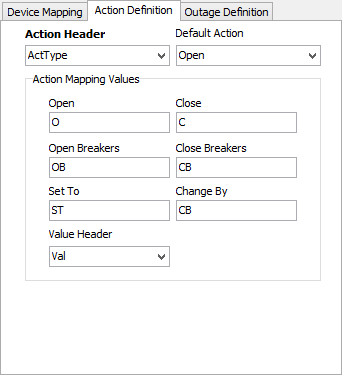
The Value Header drop down is only used if Set To or Change By actions are mapped; it names the column containing the applicable values to be used when creating either of those actions.
Outage Definition
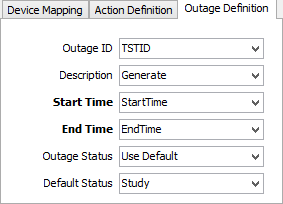
The Outage Definition tab maps values specific to Scheduled Outage configuration. If the CSV file does not include a field for an ID grouping outage actions, an ID can be generated for each row. Likewise, if no column exists specifying a human-readable description of the outage, a rough description can be generated. If the CSV file does not have a column specifying a Scheduled Outage Status, a default value may be specified. Start Time and End Time are the two required fields -- to be a scheduled outage, there must be scheduling information.